


This release brings a whole new way to trade on Raseed: a brand-new trade screen for stocks, crypto and options. It also includes a fresh stock page with the Live Nasdaq badge, a way to customize your Home and Trade screens, and your saved card details in one tap. Here’s everything that’s new.
1. A Whole New Way to Trade: A Brand-New Trade Screen
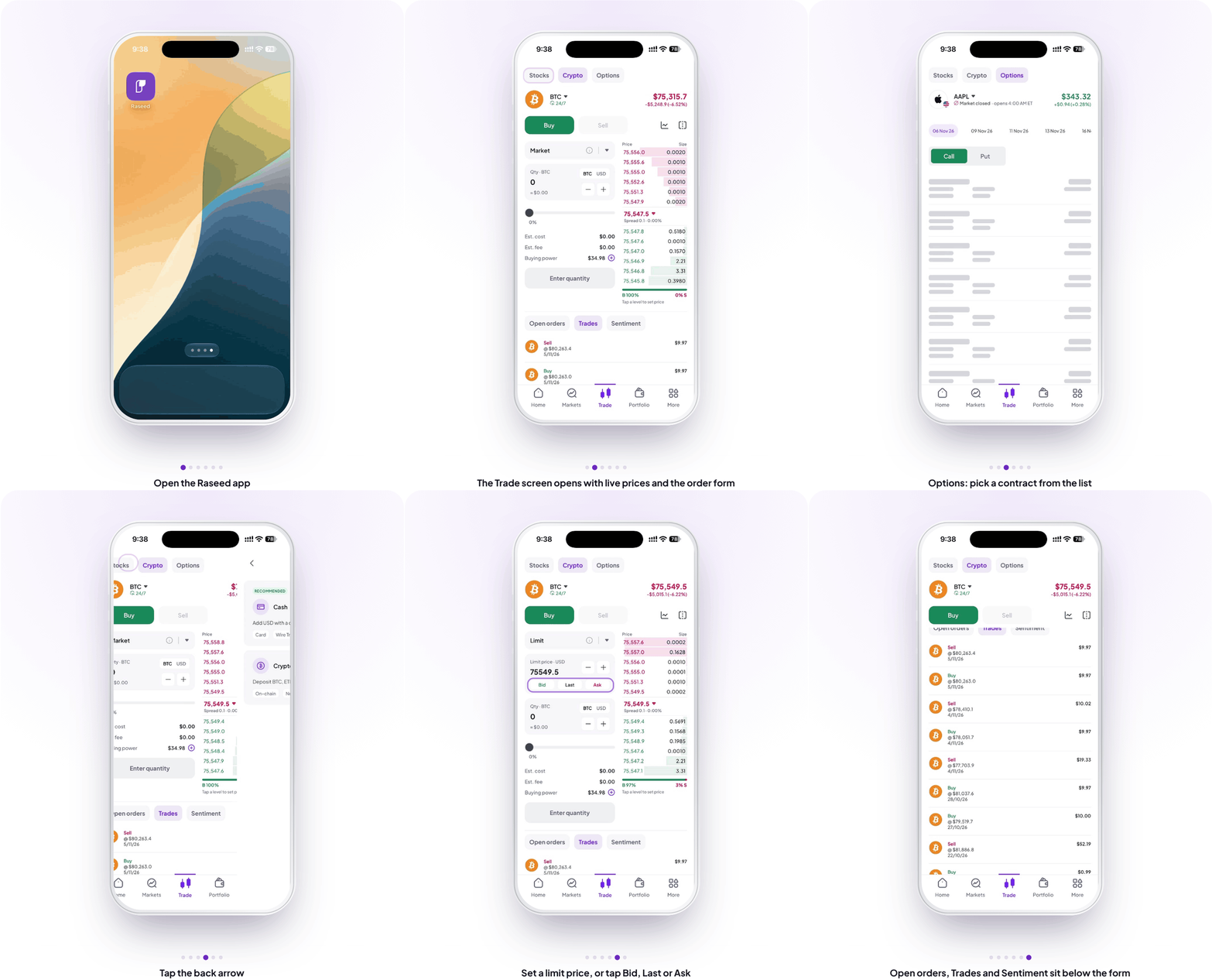
Every buy and sell on Raseed now happens on one new trade screen, built to keep everything you need in view.
At the top, switch between Stocks, Crypto and Options. Below the tabs you see the asset with its live price, daily change and market status (crypto trades 24/7). Tap the asset name to open its full page.
The order form gives you the full picture before you place an order:
- Order type: choose Market, Limit or Smart
- Quantity or amount: enter shares or coins, or switch to US dollars, use the + and − buttons, or drag the slider
- Clear costs: estimated cost, estimated fee and your buying power. Tap + next to buying power to deposit with Cash or Crypto
- Set your price in one tap: on a Limit order, use the Bid, Last and Ask buttons. You can also tap a level in the order book, or a recent market trade, to fill in the price
Until you enter a quantity, the order button reads Enter quantity. After that it simply reads Buy or Sell. If something isn’t right, for example the amount is more than your balance, a red message above the button explains why and offers a quick Cash Deposit. Review your order, confirm it, and you’ll see a success screen.
Below the form, your Open orders, Positions (for stocks you hold), Trades and Sentiment for that asset are all in one place. You can also set up DCA and Recurring orders from this same screen. On the Options tab, choose Call or Put, pick an expiry date and select a contract from the list to place your order.
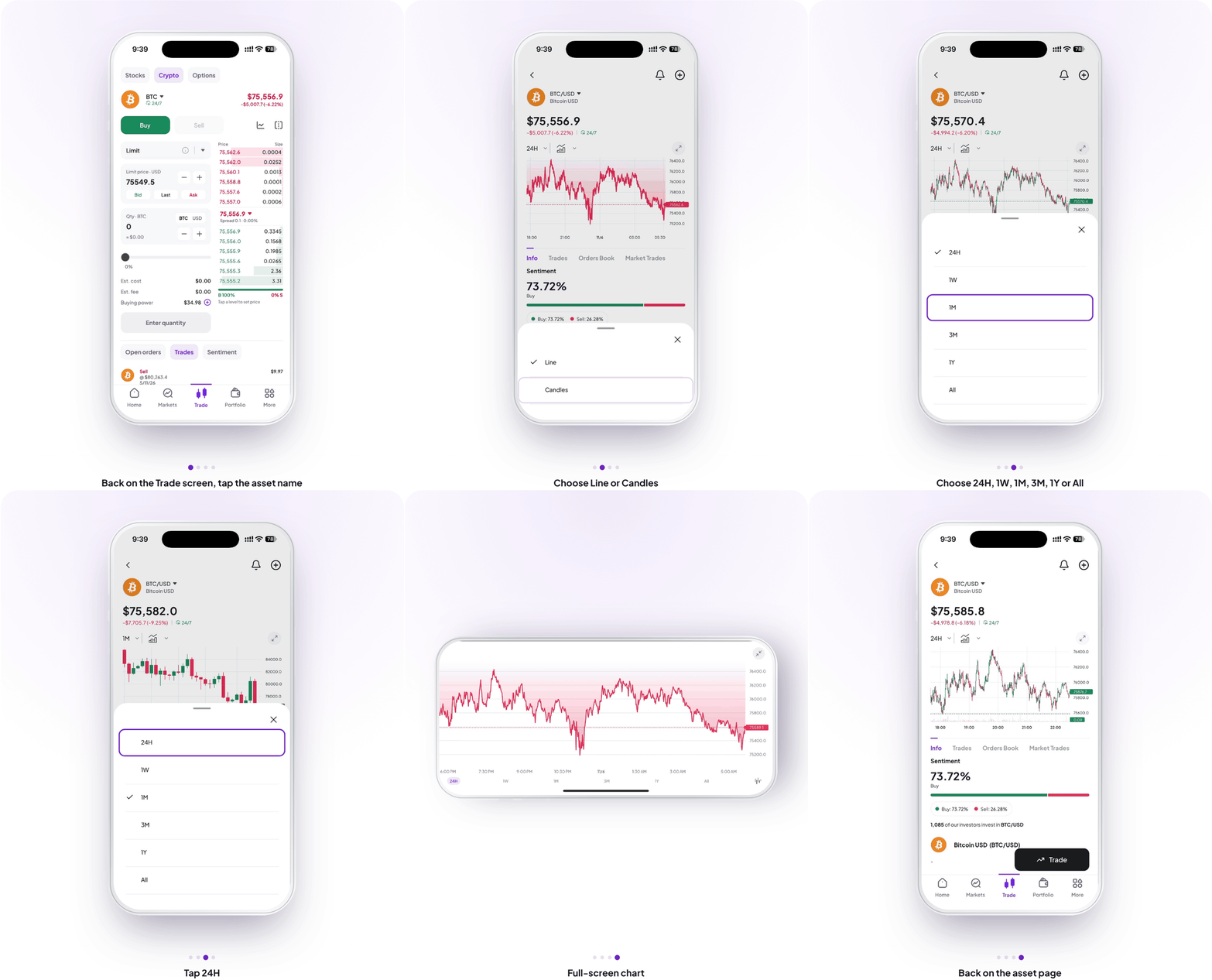
You can also change how the chart looks. Pick a time range (24H, 1W, 1M, 3M, 1Y or All) and switch the chart type between Line and Candles. On crypto pages, the tabs under the chart are Info, Trades, Orders Book and Market Trades, so live bids and asks are one tap away.
Why it matters for GCC investors
Placing an order should be quick and clear. With the live price, costs, buying power and your open orders all on one screen for stocks, crypto and options, you can make decisions faster, with fewer taps and no surprises.
How to find it
- Tap Trade in the bottom navigation bar, or tap Trade on any stock page
- Choose Stocks, Crypto or Options at the top
- Tap Buy or Sell and choose Market, Limit or Smart
- Enter your quantity or amount, then tap Buy or Sell
- Review your order and tap Confirm
You can also open the trade screen from Home, More and Portfolio.
2. A Fresh Stock Page with the Live Nasdaq Badge
The stock page has been redesigned so the chart is always on screen. Below it, three tabs hold everything else: Info (open by default), Feed and Market Trades.
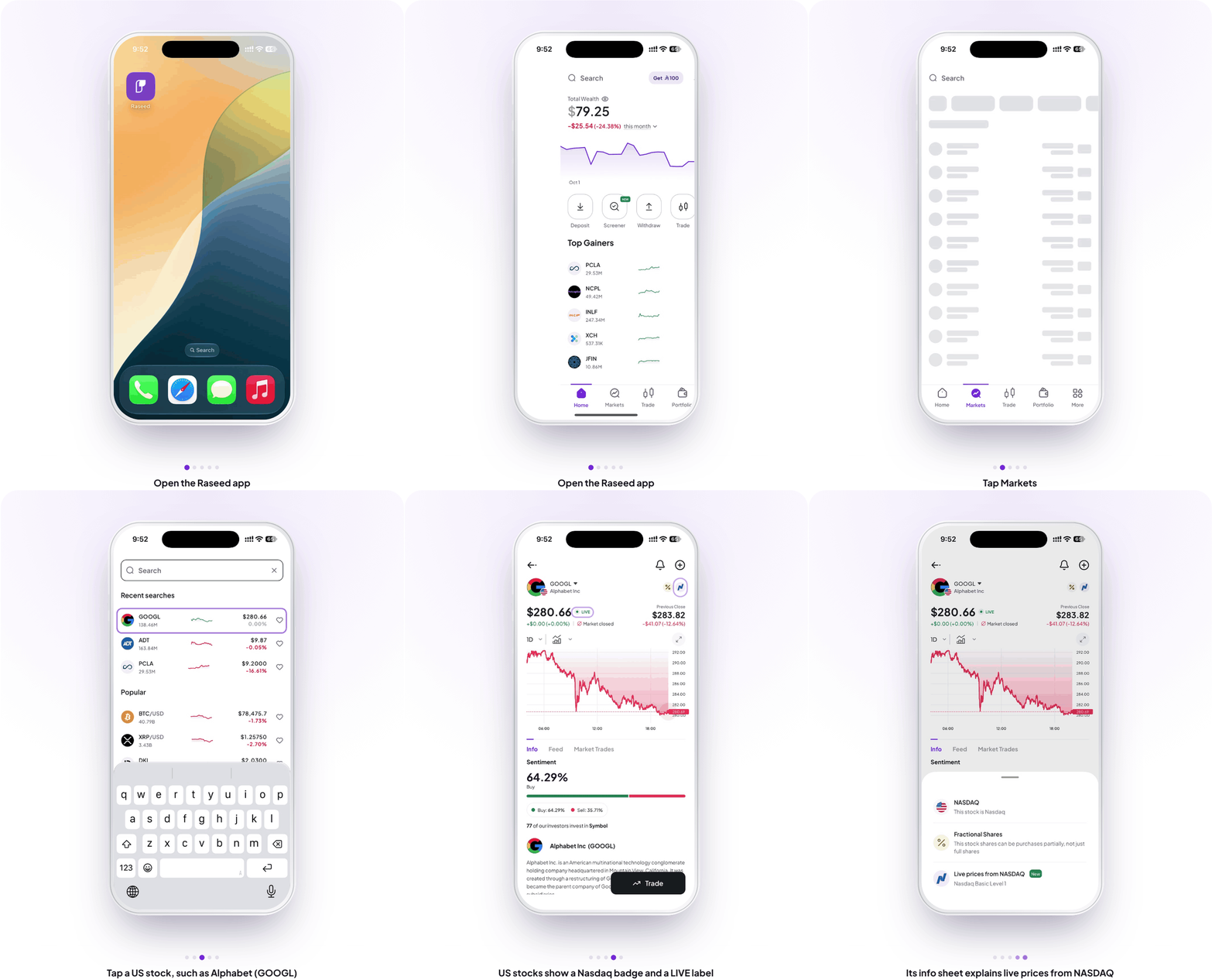
US stocks now show a Live Nasdaq badge next to the stock name, after the Shariah and Fractional badges, and a LIVE label next to the price. Tap the badge to learn more about live prices from Nasdaq.
For a closer look, tap the expand icon on the chart or turn your phone sideways to open the full-screen chart. It now fills the whole screen with every label and range button fully visible, and the collapse icon takes you straight back.
Why it matters for GCC investors
Knowing a price is live, not delayed, matters when you trade outside your local hours. The badge and LIVE label make that clear at a glance.
How to find it
- Tap Markets and open any US stock
- Look for the Live Nasdaq badge next to the name and the LIVE label next to the price
- Tap the badge to open its info sheet
- Use the icons above the chart to switch between Line and Candles and to pick a time range from 24H to All
- Scroll below the chart to switch between Info, Feed and Market Trades
3. Your App, Your Way: Customize Home and Trade
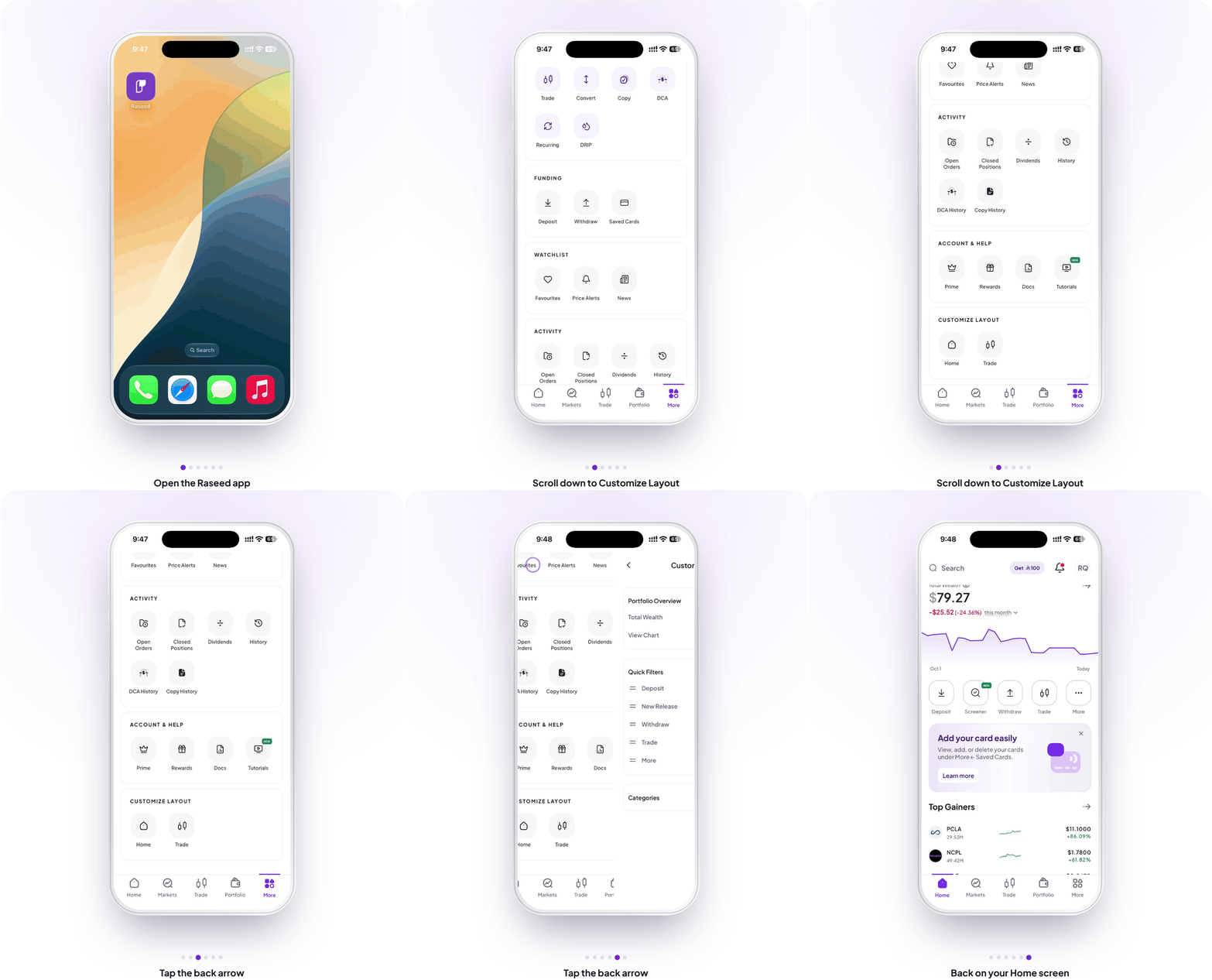
You can now choose how your Home and Trade screens are laid out, straight from the More tab. Your choice applies immediately and stays in place even after you close and reopen the app.
Why it matters for GCC investors
Everyone trades differently. Setting up your screens around how you use the app means less scrolling and faster access to what matters to you.
How to find it
- Tap More in the bottom navigation bar
- Scroll to Customize Layout
- Tap Home or Trade and choose your layout
4. Your Saved Cards at a Glance
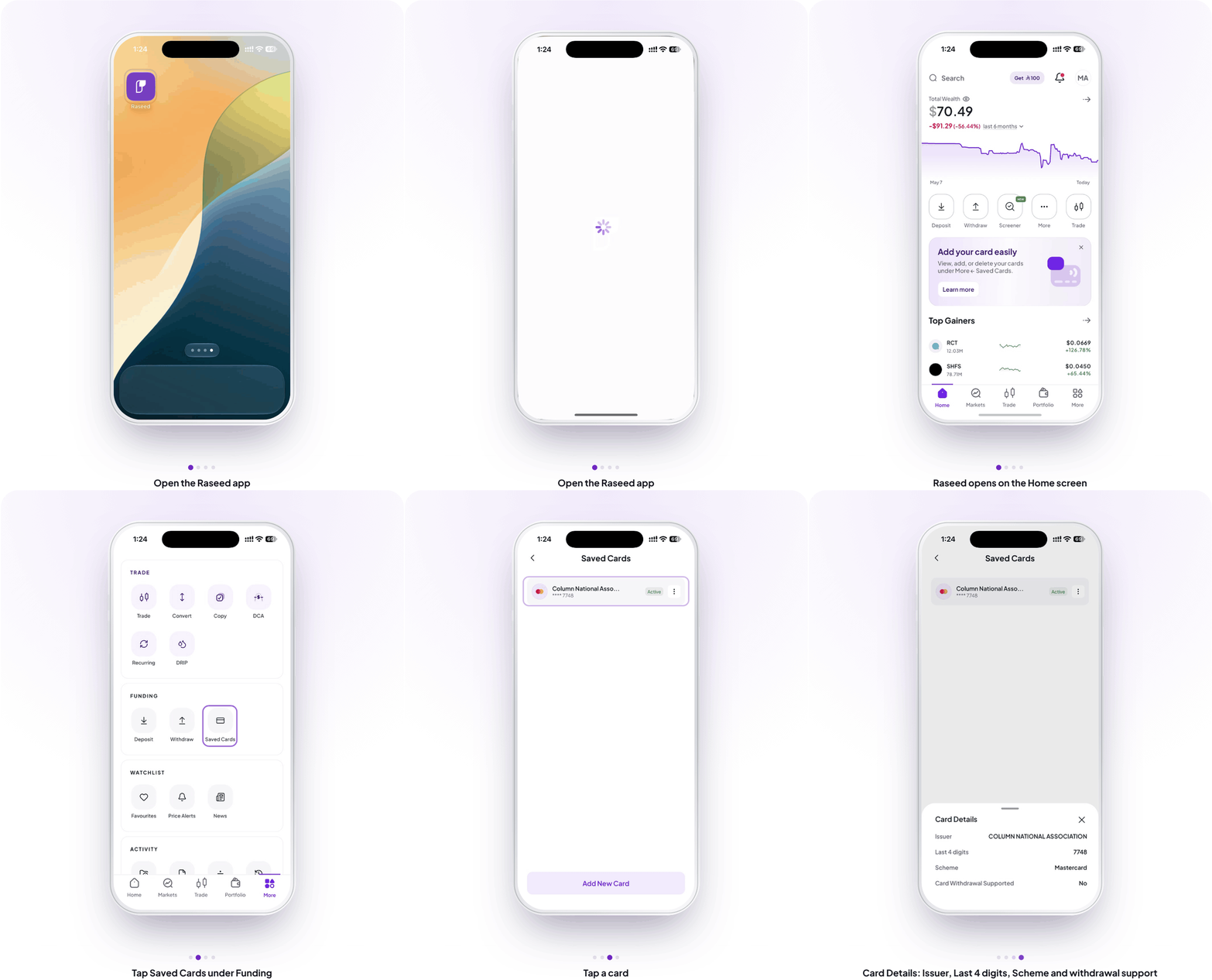
You can now open any saved card to see its details: the card issuer, the last 4 digits, the card scheme (for example Visa or Mastercard) and whether withdrawals to that card are supported.
Open More, then tap Saved Cards under Funding to see all your cards with their status, for example Active, and an Add New Card button. Tap a card to open Card Details.
Why it matters for GCC investors
Knowing straight away whether a card supports withdrawals helps you pick the right card before you withdraw, with no guesswork and no failed attempts.
How to find it
- Tap More in the bottom navigation bar
- Under Funding, tap Saved Cards
- Tap a card to open its Card Details
Also in This Update
- Faster, more reliable card deposits, with a clear reason shown if a card is declined
- Card scanning on Android now works the same way as on iPhone, including cards with raised digits and vertical cards
- Faster replies in support chat, with a typing indicator and replies that appear as they’re written
- Smoother full-screen charts and a faster app overall
- The back arrow now looks the same on every screen
How to Get the Update
Version 3.1.68 is available now on iOS and Android. Open the App Store or Google Play, search for Raseed, and tap Update. If automatic updates are on, it will arrive on its own.
Update Raseed to get these features
Open the App Store or Google Play, search for Raseed, and tap Update to start using the new features today.
Open Raseed →
Disclaimer
This article is for educational and informational purposes only. It is not investment advice, nor a recommendation, offer or solicitation to buy or sell any security or digital asset. Investing involves risk, including possible loss of principal. Past performance does not guarantee future results.
Securities brokerage services are provided by Fullerverse (SC) Limited, a securities broker-dealer licensed and regulated by the Financial Services Authority of Seychelles (Licence No. SD152). Fullerverse (SC) Limited is a wholly-owned subsidiary of Raseed Invest Inc. Registered address: House of Francis, Room 302, Ile Du Port, Mahe, Seychelles.
Cryptocurrency services are made available by Raseed Crypto LLC (“Raseed Crypto”), a FinCEN-registered money services business (MSB Registration No. 31000316890439) and a wholly-owned subsidiary of Raseed Invest Inc. Cryptocurrencies are not stocks and your cryptocurrency investments are not protected by either FDIC or SIPC. Cryptocurrency is highly speculative in nature and involves a high degree of risk, including volatile market price swings, market manipulation, flash crashes and cybersecurity risks. Cryptocurrency regulations are continuously evolving, and it is your responsibility to understand and abide by them. Cryptocurrency trading can lead to large, immediate and permanent loss of financial value. You should have appropriate knowledge and experience before engaging in cryptocurrency trading. For additional information, please see our Crypto Risk Disclosures.
Cryptocurrency services are not offered by, and are not available through, Raseed Invest Limited, which is regulated by the Dubai Financial Services Authority. Products and services referenced in this article are not available in all jurisdictions and are not directed at any person in a jurisdiction where their offer or availability would be contrary to local law or regulation.