

Raseed just got a meaningful upgrade across the board. This release brings a redesigned referral programme with a full rewards dashboard, a rebuilt Copy Trade experience, holdings previews on share cards, a dedicated News tab, a cleaner Info page, security alerts for new device sign-ins, and — for the first time — full iPad support.
Here is everything that is new.
Referral Programme 2.0: Earn Rewards for Every Friend You Invite
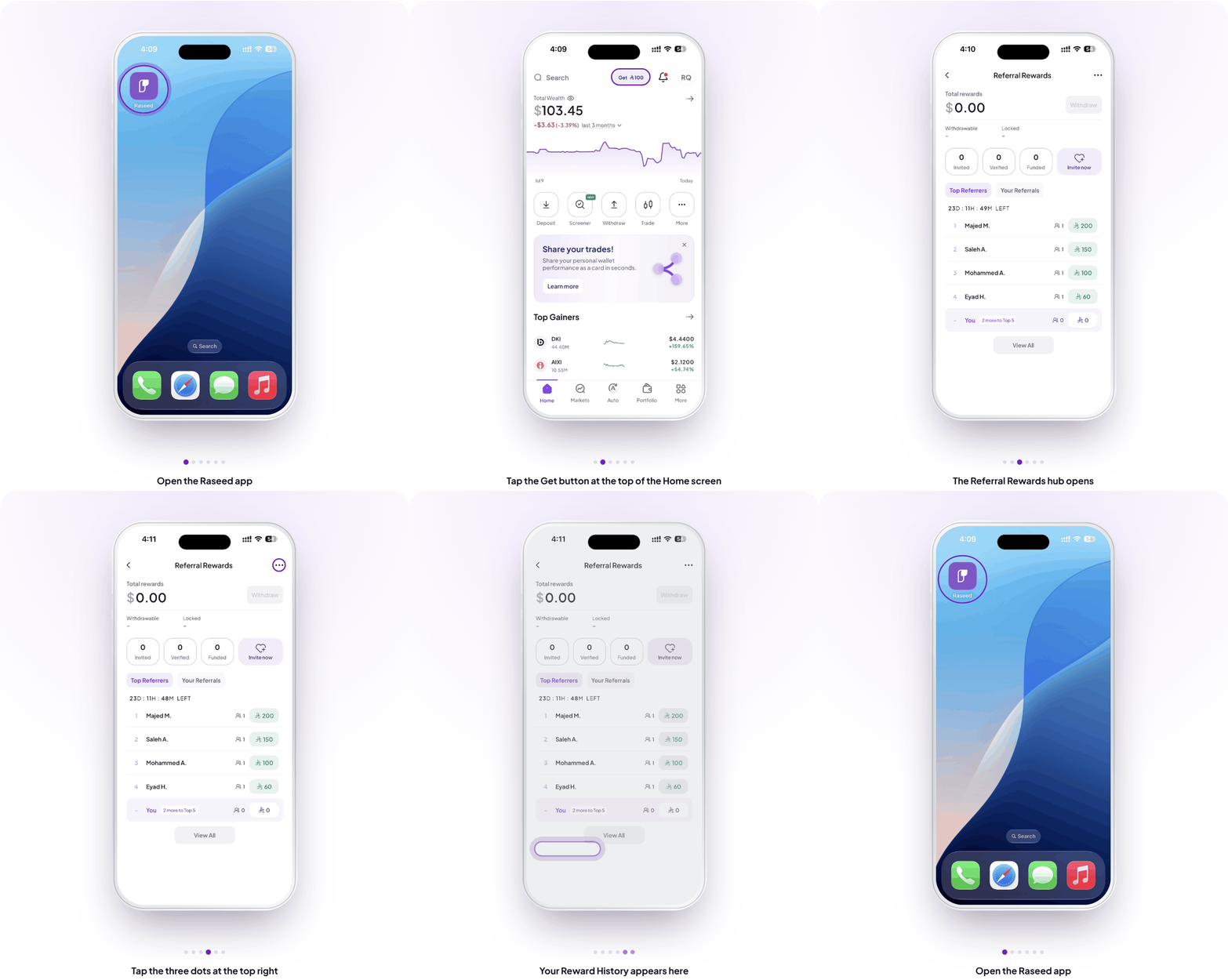
The referral experience has been rebuilt from the ground up. Instead of a single invite screen, you now get a full rewards hub with two tabs — Top Referrers, which shows you how you rank against other Raseed users, and Your Referrals, which tracks everyone you’ve invited and where they are in the sign-up process. A new Reward History section logs every reward you’ve earned, so nothing gets lost.
The invite flow itself is simpler: one tap to copy your link or share it directly from the app.
Why It Matters for GCC Investors
Word-of-mouth is how most people in the region discover investment apps. This update turns that into something tangible — you refer, your contact joins, you both benefit.
How to Find It
Go to More → Rewards, or tap the Get button at the top of the Home screen. To see everything you have earned, tap the three dots at the top right of the Referral Rewards screen and choose Reward History.
Read more about our Referral Terms & Conditions.
Redesigned Copy Trade Experience
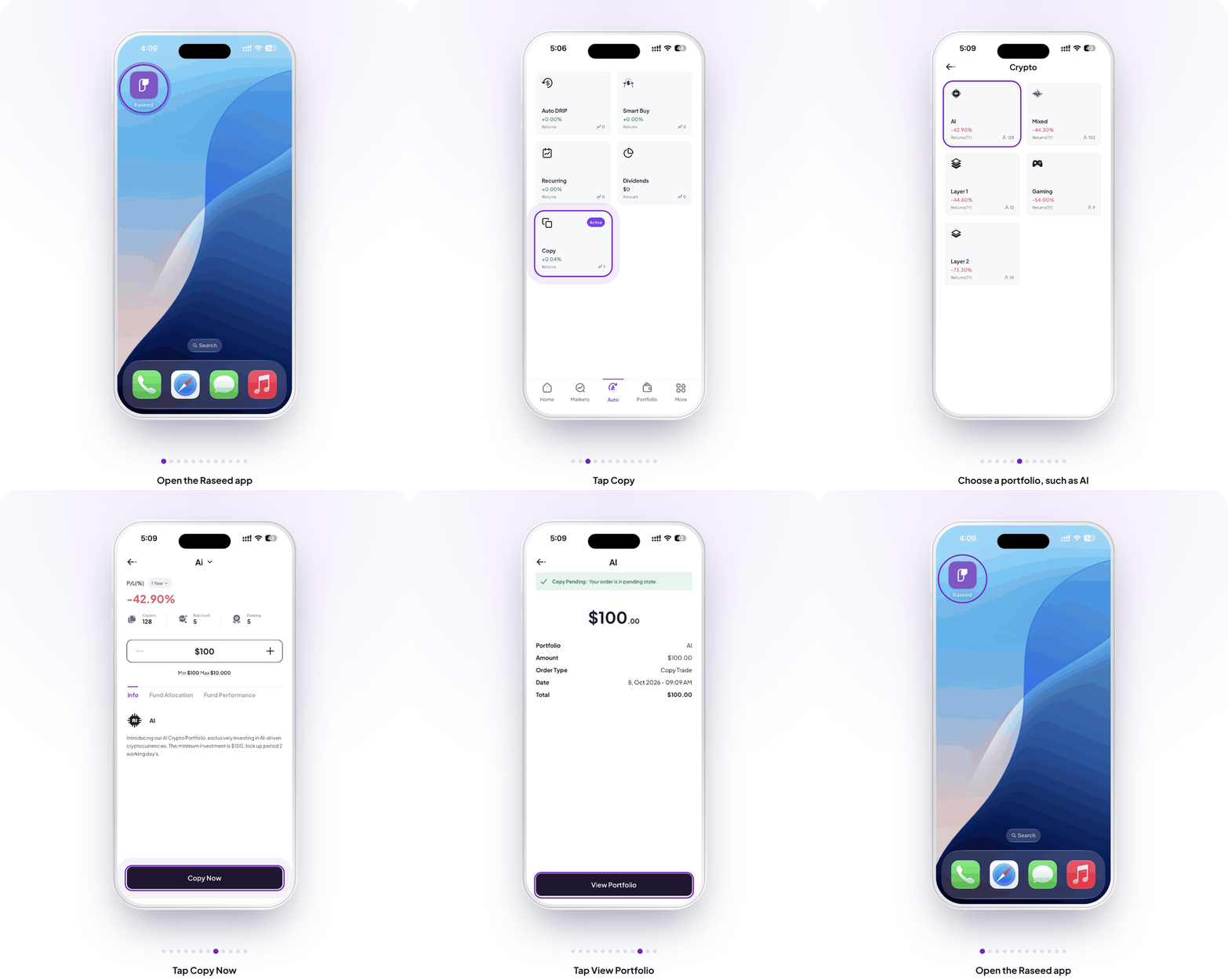
Copy trading has been rebuilt to be clearer at every step. The Copy home screen now shows two tabs: Top Performing and Categories. Categories lets you filter by strategy type — Robo, Crypto and Smart.
Inside each portfolio, the detail page shows Copiers, Risk Level and Ranking at a glance, so you can see how others are using it before you commit. The investment input shows the limits upfront — Min $100, Max $10,000 — and three tabs, Info, Fund Allocation and Fund Performance, let you dig into the details.
Tapping Copy Now opens a confirmation sheet with an order summary — portfolio name, amount, order type, date and total — before anything is executed. After you confirm, a View Portfolio button takes you straight to your active copy trade. Your positions appear under My Copy Trades with live value and P/L. To stop, tap the position and hit Uncopy.
Why It Matters for GCC Investors
Copy trading is one of the most-used features in the region — many investors prefer following a managed strategy over picking individual stocks. A clearer flow with upfront risk information means more confident decisions and fewer drop-offs mid-way through.
How to Find It
Go to Auto → Copy → Categories or Top Performing, select a portfolio, then tap Copy Now.
Holdings Preview on Share Cards
When you share a copy trade portfolio or your personal wallet, the share card now shows the actual holdings — asset logos stacked side by side, with a +N count if there are more than fit on screen. For copy trade cards, a wallet icon confirms it’s a managed portfolio at a glance.
This makes shared cards more informative and more trustworthy — someone looking at it can immediately see what’s inside, not just a number.
Why It Matters for GCC Investors
Sharing performance is common in investing communities across Saudi Arabia and the UAE. A card that shows real holdings carries more weight than one that shows only a return figure.
How to Find It
Auto → Copy → share icon, or Portfolio → share button.
News Tab and Redesigned Info Page
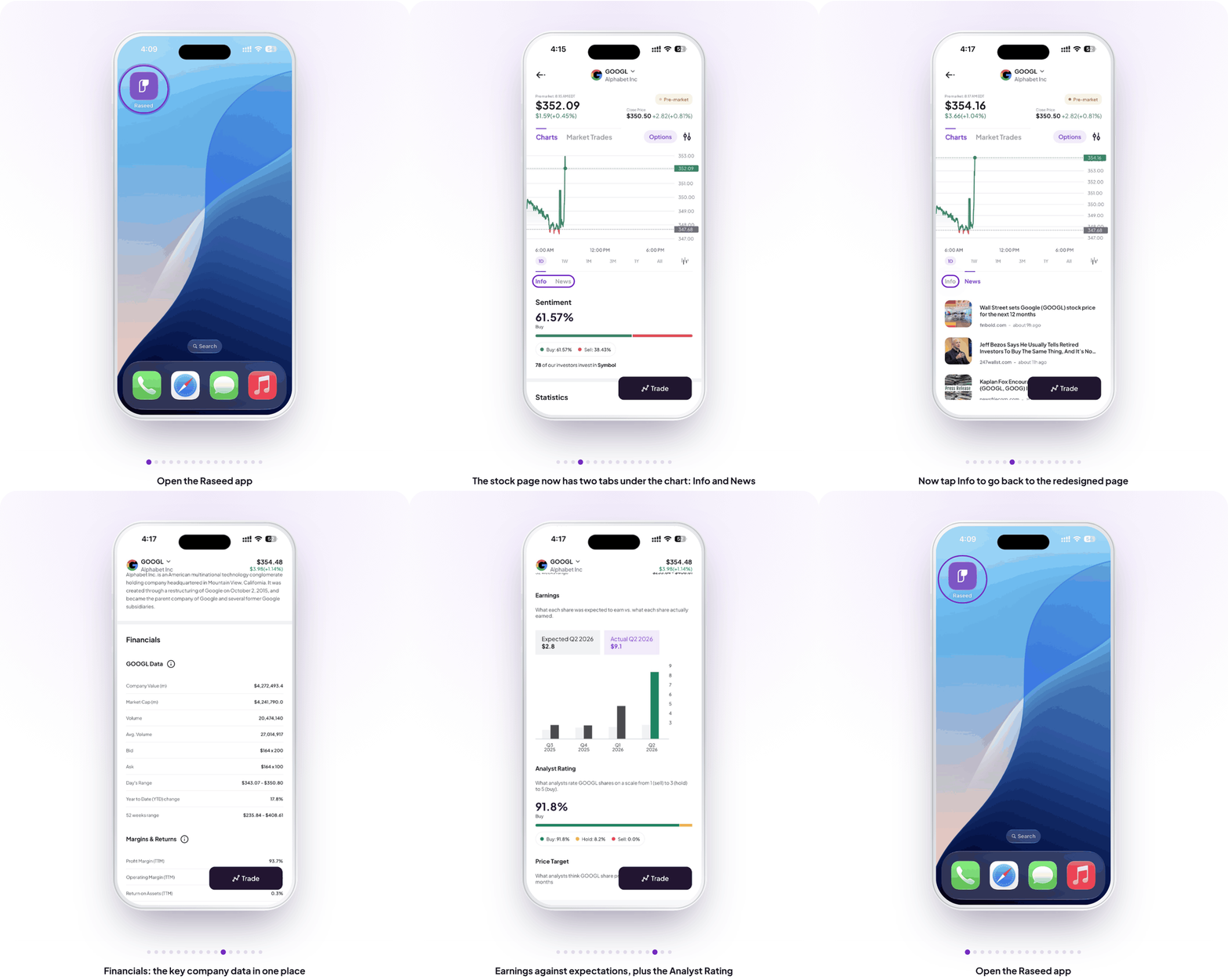
The old Feed tab is now News — same content, cleaner label, easier to find. On the stock detail page, the Info tab has been redesigned as a single continuous scroll, removing the sub-tabs that used to fragment the view. Market Sentiment now sits at the top of Info, giving you a read on the stock before you dig into the fundamentals below it.
Why It Matters for GCC Investors
GCC investors often check sentiment and news before making a move. Having both in one uninterrupted flow — without switching tabs — removes friction from the research process.
How to Find It
Markets → any stock → Info tab, or bottom nav → News.
Security Alerts for New Device Sign-Ins
If your Raseed account is accessed from a device it hasn’t seen before, you’ll now receive a CRITICAL security alert directly in your notification inbox. The notification carries a red unread dot that stays visible until you open it. Once viewed, it clears automatically.
No action required if it was you. If it wasn’t, you’ll know immediately.
Why It Matters for GCC Investors
Account security is a top concern for investors managing real money. This alert gives you immediate visibility into any unauthorised access — without needing to dig through settings.
How to Find It
Notification bell → inbox.
Raseed Now Supports iPad
The app now runs natively on iPad. Layouts adapt to the larger screen — wider views, better use of space, and proper orientation handling whether you’re in portrait or landscape. All features and flows available on iPhone work the same way on iPad, across different iPad screen sizes.
Why It Matters for GCC Investors
Many investors in the region use iPad as a primary device for reading and research. Having the full Raseed experience on a larger screen makes it easier to review portfolios, monitor copy trades, and stay on top of the market — all without switching to your phone.
How to Find It
Download or update Raseed from the App Store on any iPad.
Also in This Update
- Copy Trade performance improvements and faster load times
- Improved notification behaviour across the app
How to Get the Update
Open the App Store or Google Play, search for Raseed, and tap Update. Already on auto-updates? It’ll arrive on its own.
Update Raseed to get these features
Open the App Store or Google Play, search for Raseed, and tap Update to start using the new features today.
Open Raseed →
Disclaimer
This article is for educational and informational purposes only. It is not investment advice, nor a recommendation, offer or solicitation to buy or sell any security or digital asset. Investing involves risk, including possible loss of principal. Past performance does not guarantee future results.
Securities brokerage services are provided by Fullerverse (SC) Limited, a securities broker-dealer licensed and regulated by the Financial Services Authority of Seychelles (Licence No. SD152). Fullerverse (SC) Limited is a wholly-owned subsidiary of Raseed Invest Inc. Registered address: House of Francis, Room 302, Ile Du Port, Mahe, Seychelles.
Cryptocurrency services are made available by Raseed Crypto LLC ("Raseed Crypto"), a FinCEN-registered money services business (MSB Registration No. 31000316890439) and a wholly-owned subsidiary of Raseed Invest Inc. Cryptocurrencies are not stocks and your cryptocurrency investments are not protected by either FDIC or SIPC. Cryptocurrency is highly speculative in nature and involves a high degree of risk, including volatile market price swings, market manipulation, flash crashes and cybersecurity risks. Cryptocurrency regulations are continuously evolving, and it is your responsibility to understand and abide by them. Cryptocurrency trading can lead to large, immediate and permanent loss of financial value. You should have appropriate knowledge and experience before engaging in cryptocurrency trading. For additional information, please see our Crypto Risk Disclosures (https://files.raseedcapital.com/disclosures/library/CryptoRiskDisclosures.pdf).
Cryptocurrency services are not offered by, and are not available through, Raseed Invest Limited, which is regulated by the Dubai Financial Services Authority. Products and services referenced in this article are not available in all jurisdictions and are not directed at any person in a jurisdiction where their offer or availability would be contrary to local law or regulation.